
Should you follow the “shortest” route or the “fastest” route? You tap in your destination, the map app does its whirring and thinking, and boom – often you get a couple of options. They look similar, maybe one saves you 10 miles but adds 15 minutes, or vice versa. What gives? And more importantly, which one should you actually pick?
Understanding the difference isn’t map nerd stuff; it can genuinely make your drive smoother, less stressful, and maybe even save you some gas money. So let’s decode what your map app is trying to tell you.
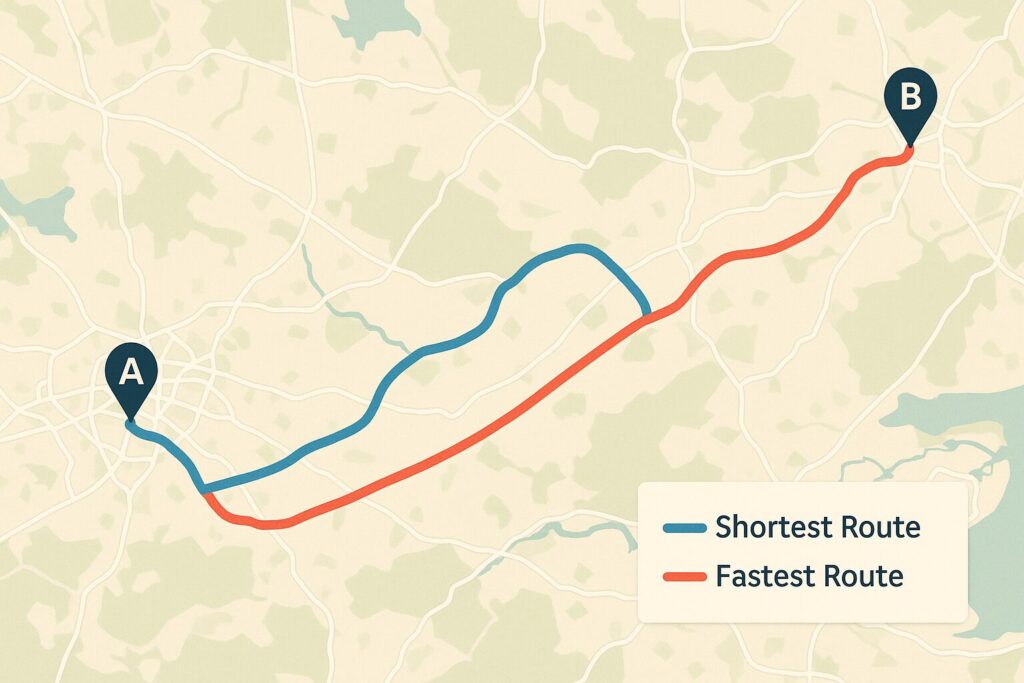
Shortest Route: This is purely about physical distance. It finds the path that covers the fewest miles or kilometers between point A and point B.
Fastest Route: This is all about estimated travel time. It calculates which path will likely get you there sooner, even if it means covering a bit more ground.
Knowing this difference is key, because blindly picking one without understanding why they’re different can lead you into unexpected delays or just a less pleasant drive.
Why Fewer Miles Doesn’t Always Mean Less Time
So, why would a longer route ever be faster? Your map app is constantly juggling a bunch of real-world factors:
Traffic: This is usually the main reason. That shorter route might cut straight through a city center that’s currently gridlocked, while the longer route uses a bypass highway where traffic is flowing freely. Even a few miles of bumper-to-bumper traffic adds way more time than cruising an extra 10 miles on an open freeway.


Road Type & Speed Limits: A route that uses primarily high-speed interstates (say, 65-75 mph zones) will cover distance much faster than a shorter route that relies on two-lane highways (55 mph) or surface streets cutting through towns (30-45 mph with stop signs and lights).
Stoplights & Intersections: Every time you stop, you lose time. Shorter routes through populated areas often involve dozens of traffic lights and stop signs, while highways usually let you keep moving.
Construction & Roadworks: Known closures or lane restrictions obviously slow things down, and the app tries to route you around the worst of it for the “fastest” option.
Terrain (Sometimes): While less of a factor than traffic, very steep hills or incredibly winding roads naturally slow down your average speed compared to flatter, straighter routes.
Think about driving around a major city. The “shortest” way might be straight through downtown on local streets. But if it’s anywhere near rush hour (or even midday), the “fastest” way is almost certainly going to be taking the longer beltway or bypass highway around the congestion, even if it adds 15 miles to the trip odometer.
How Your App Knows All This Stuff (A Quick Peek Under the Hood)
It feels a bit like magic sometimes, right? How does Google Maps or Waze know about that accident that just happened? It’s a combination of things:
Real-Time Data: Your phone (and thousands of others) anonymously sends back location and speed data, showing where traffic is crawling vs. flowing. Sensors embedded in roads in some areas also contribute.

Historical Data: The app knows that certain roads typically get jammed at specific times of day and factors that into its predictions.
User Reports: Especially with apps like Waze, drivers report accidents, construction, police presence, etc., adding another layer of real-time info.
Fancy Algorithms: Complex calculations (think AI and machine learning buzzwords) constantly analyze all this data to predict travel times and find the path with the least expected delay right now.
It’s not perfect, of course – conditions can change rapidly. But it’s generally pretty good at figuring out which route is likely to save you time.
Okay, So Which Route Should You Choose? (It Depends!)
There’s no single “best” answer – it depends entirely on your priorities for that specific drive:
Are you really in a hurry? Got a hotel check-in deadline, need to catch a ferry, trying to beat an incoming storm? Then “Fastest” is almost always your best bet. Trust the app’s traffic data.
Trying to save gas money (or be greener)? This one’s trickier. The “Shortest” route might seem obvious, but if it involves a lot of stop-and-go traffic or slow speeds through towns, you might actually burn more fuel than sticking to the “Fastest” highway route at a steady, efficient speed. You have to weigh the distance saved against the type of driving. Generally, smooth sailing uses less gas than constant braking and accelerating.
Do you just HATE traffic? If sitting in jams stresses you out more than anything, the “Fastest” route is likely designed to minimize that pain. However, sometimes you might see a third option that’s maybe 5 minutes slower than “Fastest” but uses less-crowded secondary roads. Looking at the live traffic colors (red/yellow/green) on the map display can help you decide if a slightly longer ETA is worth it for a less congested drive.
Looking for the Scenic Route? Neither “Shortest” nor “Fastest” prioritizes views. Map apps sometimes have a “Scenic Route” option, or you might need to zoom in, look for roads paralleling coastlines or rivers, or routes through state/national parks, and manually choose your path.
Driving an Electric Vehicle? Your main concern might be hitting charging stations. You’ll likely use an EV-specific planning app or feature, where the “best” route is dictated by charger locations and your car’s range, which could differ from both the shortest and fastest gasoline-car routes.
The Takeaway:
Don’t just blindly follow the default route your map app suggests. Take a second to look at the options it provides. See why they are different – is one avoiding a big red traffic snake? Does one stick to highways while the other cuts through towns? Understanding the “Shortest” vs. “Fastest” logic lets you make an informed choice based on what matters most to you right now – saving time, saving gas, avoiding stress, or maybe just finding a pleasant drive. It’s just another way to make your road trip run a little smoother.
Drive smart and pick the path that works best for your adventure!